Together Link: open models in the harness you already use. Start with one command today.
Quick Answer
Together Link integrates existing workflows with open models from Together AI, reducing costs by over 50%.
Quick Take
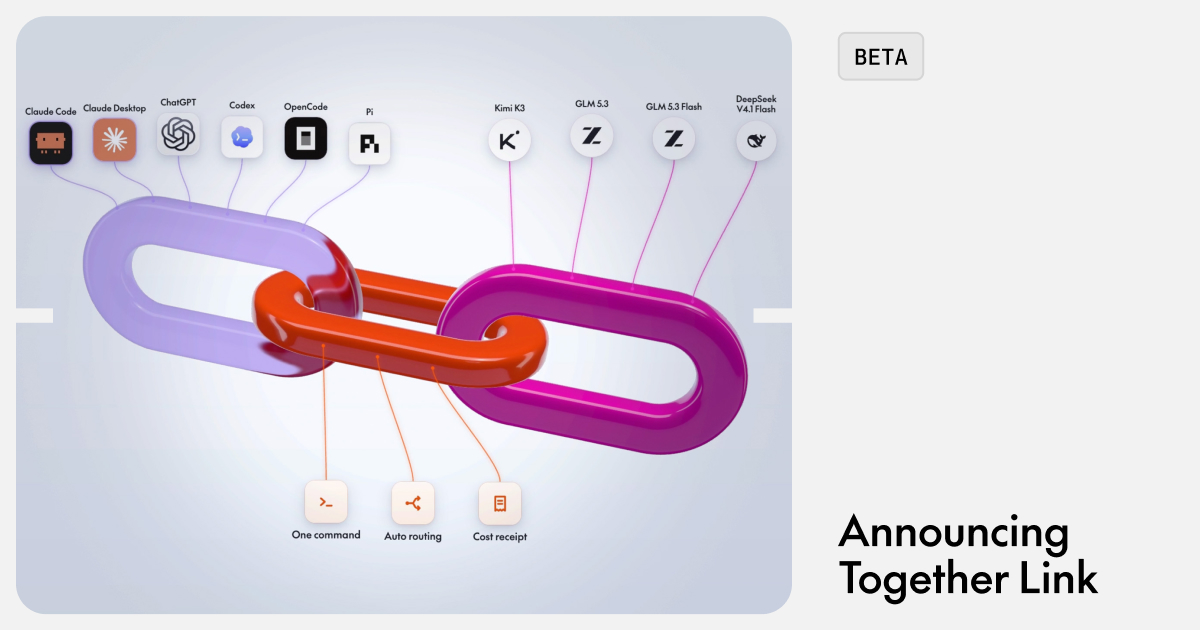
It supports various coding agents like Claude Code and Codex, allowing seamless transitions to models such as Kimi K3 and GLM 5.3, which handle complex tasks at lower prices. Users can set it up with a single command and track savings per session.
Key Points
- Reduces engineering costs by over 50% using open models.
- Supports popular coding agents like Claude Code and Codex.
- Seamless integration with existing workflows; no new learning required.
- Single command setup connects to Together AI with an API key.
- Session tracker shows savings compared to traditional models.
📖 Reader Mode
~2 min read.jpg)
Summary
Together Link connects the harness your team already uses to the best open models on Together AI and cuts your spend by over 50%. Same agent, same workflow, a fraction of the bill.
Coding agents are now commonplace for engineering teams, and every task you give them, from a one-line fix to a full rewrite, often runs on the same premium model. At scale that gets expensive quickly: engineering orgs are spending anywhere from tens of thousands to millions of dollars a month on closed models.
Open models have meaningfully closed the gap between top models from closed labs. Leaders like Kimi K3 and GLM 5.3 now handle many of the hardest coding tasks at a fraction of the per-token price, while small and capable models like GLM 5.3 Flash and DeepSeek V4.1 Flash handle everyday coding tasks. Together Link brings them into the tools your team already knows.
Works where you already work
Together Link supports Claude Code, Claude Desktop, Codex (in the ChatGPT app and the CLI), OpenCode, and Pi. Your team keeps working normally: settings and logins stay as they were, there's nothing new to learn, and going back to the native closed models takes one command. You can be up and running on open models in just a few minutes.
Getting started
curl -fsSL https://link.together.ai/install | bash- Run one command to set up Together Link: Your agent opens exactly as before, now connected to Together AI with your Together AI API key. Create an account for an API key.
- Use “Auto” to pick a model with the Together AI Router: It reads each session's first task and sends it to the right model: quick fixes go to fast, low-cost models, and hard problems get frontier capability. If you bring an Anthropic key, it routes between Opus 5.5 and GLM 5.3. Without one, it routes between GLM 5.3 and GLM 5.3 Flash. Routing happens once per session, so prompt caching keeps working.
- See your savings after each session. A per-session tracker shows what you spent next to what the same session would have cost on Opus 5.5.
Billing runs on your existing Together API key, against serverless pay-as-you-go or credit packs. You don't need a separate contract.
Built on the serverless platform developers already choose
Together Link runs on Together's serverless inference, the same infrastructure developers already pick for these models on OpenRouter. Together AI serves the largest share of OpenRouter tokens for DeepSeek V4.1 Flash (40.8%), GLM 5.3 Flash (28.2%), and Kimi K3 (23.1%), with competitive speed and pricing across the board. (As of 9/30/2026 footnote)
Next steps
Create a Together AI account.
Read our docs.
Rolling it out across your engineering org? Talk to our team and we'll help you plan it.
— Originally published at together.ai
Want this in your inbox every morning?
Daily brief at your local 8am — bilingual EN/中文, free.
More from Together AI
See more →
Open, convenient and predictable: Introducing Provisioned Throughput
Together AI introduces Provisioned Throughput, offering guaranteed inference capacity for MiniMax M3 and GLM-5.2 at $0.05 per PTU per minute, achieving costs up to 90% lower than Claude Opus 4.8. This new model provides predictable pricing and a 99% uptime SLA, catering to companies transitioning to open weight models for production workloads.