Build an AI-powered AWS support companion with Amazon Bedrock AgentCore
Quick Answer
The AWS Support Companion, built using Amazon Bedrock AgentCore, streamlines incident investigations by consolidating multiple AWS tools into a single conversational interface, reducing resolution time significantly.
Quick Take
It utilizes Strands Agents for orchestration and connects to AWS services via the (MCP), allowing for efficient analysis of CloudWatch logs, documentation searches, and support case creation.
Key Points
- Integrates AWS Management Console, CloudWatch, and documentation into one interface.
- Reduces investigation time from 30-45 minutes to a streamlined process.
- Deploys with a single CloudFormation script for easy setup.
- Utilizes Amazon Nova Pro model for enhanced AI capabilities.
- Includes security features to protect sensitive information during operations.
📖 Reader Mode
~9 min readManaging AWS infrastructure often means switching between consoles, searching documentation, and manually creating support cases. For each incident, an engineer opens the AWS Management Console, checks Amazon CloudWatch, searches AWS documentation, reviews community posts, and files a support case. This context-switching adds up to 30–45 minutes per investigation before resolution work begins.
In this post, you build an AWS Support Companion using Amazon Bedrock AgentCore. The agent uses Strands Agents as the orchestration framework and connects to AWS services through the Model Context Protocol (MCP). By the end, you have a working agent that can analyze CloudWatch logs, search AWS documentation, query community knowledge from AWS re:Post, and create support cases, all from a single conversational interface. The solution deploys with a single script using AWS CloudFormation and includes a web frontend built on AWS Amplify for interacting with the agent.
The incident investigation bottleneck
AWS support and operations teams follow a repetitive pattern for every incident:
- Open the AWS Management Console and navigate to the affected service.
- Check CloudWatch logs and metrics for error patterns.
- Search AWS documentation for relevant troubleshooting guidance.
- Review community posts on AWS re:Post for similar issues.
- Compile findings and create a support case with the appropriate severity.
- Attach evidence and context to the case.
Each step requires a different tool and interface. Manual investigation limits the speed at which teams can respond, and the context gathered in one tool does not carry over to the next.
Solution overview
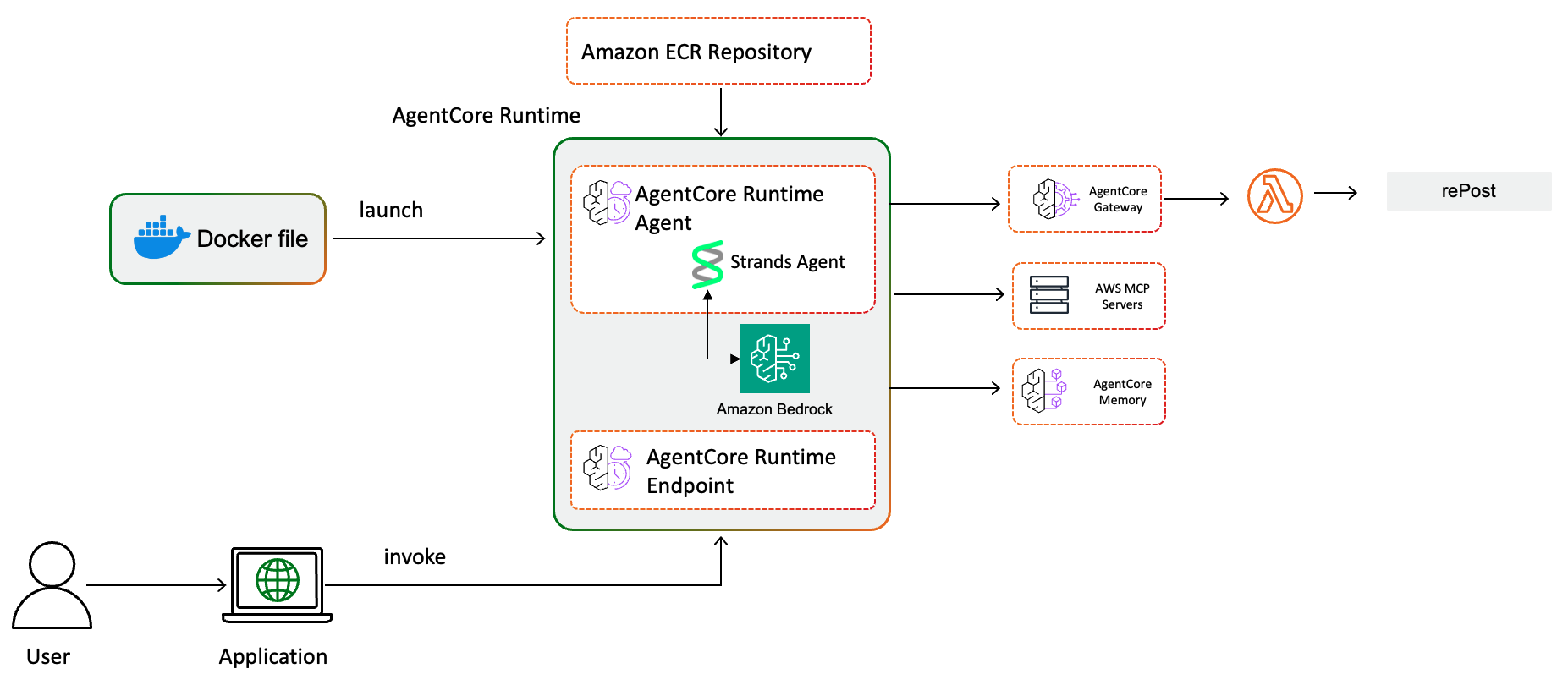
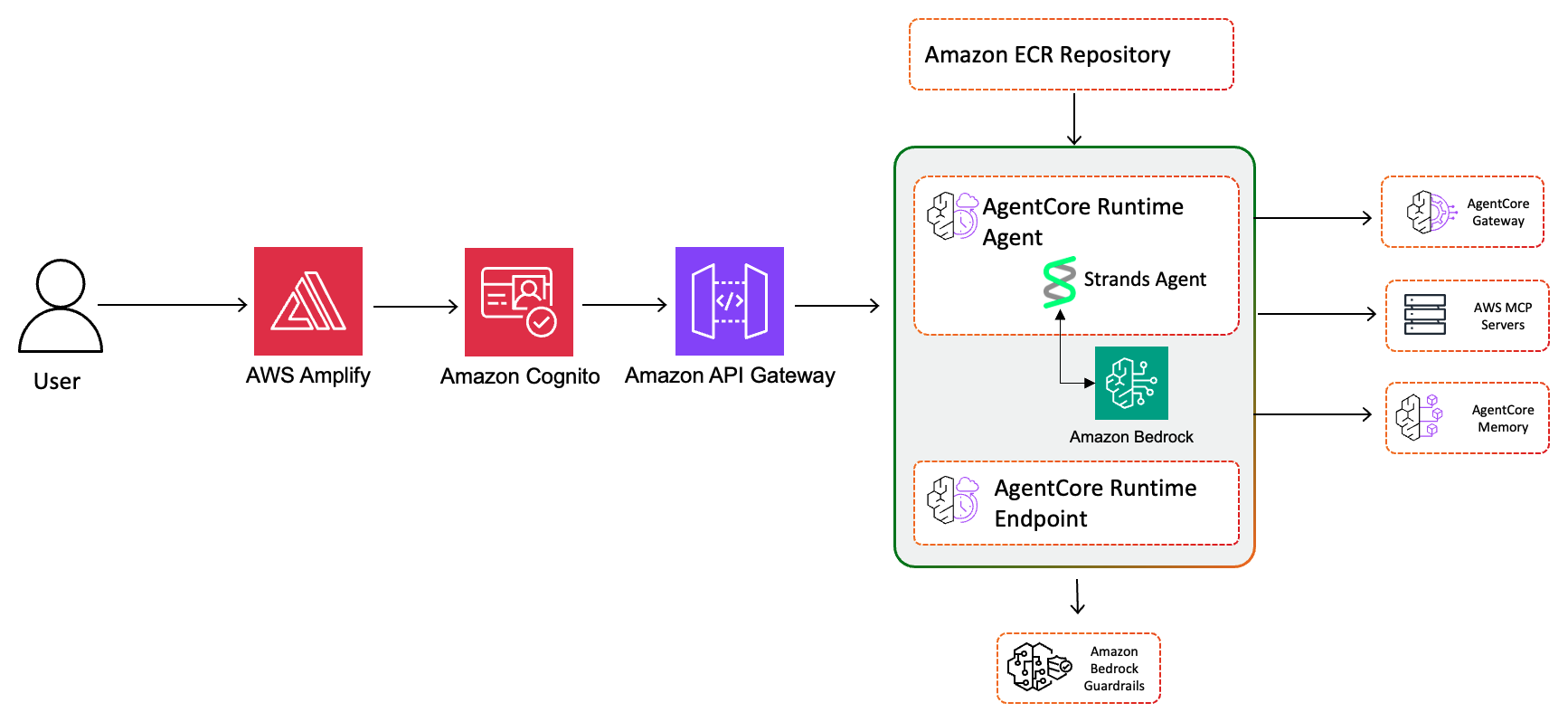
The solution consolidates these steps into a single conversational agent deployed on Amazon Bedrock AgentCore. AgentCore handles the operational complexity of running a production AI agent (session isolation, auto scaling, security, and observability), so you focus on what the agent does rather than how it runs.
The agent connects to the following components:
Agent runtime – A Python application using Strands Agents, packaged as a Docker container and deployed to AgentCore Runtime. The agent orchestrates calls to a foundation model (FM) (Amazon Nova Pro through Amazon Bedrock) and tools based on your input. You can swap to supported models without changing the agent code.
MCP servers – Three MCP servers give the agent access to AWS documentation (aws-documentation-mcp-server), AWS Support APIs (aws-support-mcp-server), and AWS service APIs (aws-api-mcp-server). MCP provides a standard protocol for AI agents to receive context from external tools.
AgentCore Gateway – Centralizes tools into reusable, secure endpoints. The gateway provides access to AWS re:Post for community knowledge through an AWS Lambda-backed target with Amazon Cognito JSON Web Token (JWT) authentication.
AgentCore Memory – Maintains short-term conversation context so the agent builds on previous troubleshooting steps within a session.
API and frontend layers – Amazon API Gateway with Cognito authorization, AWS WAF rate limiting, and request validation fronts a Lambda function that invokes the AgentCore Runtime. An AWS Amplify-hosted React application provides the user interface with Cognito authentication for sign-up and sign-in.
Guardrails – An Amazon Bedrock Guardrails configuration filters harmful content, helps block prompt injection attacks, redacts personally identifiable information (PII) such as AWS keys, credit cards, and Social Security numbers, and restricts the agent to AWS support topics.
Infrastructure – A single CloudFormation template deploys all resources, including AWS Identity and Access Management (IAM) roles, Cognito user pools, AWS Key Management Service (AWS KMS) keys, AWS Secrets Manager secrets, and AWS Systems Manager Parameter Store parameters.
Prerequisites
Before you begin, confirm that you have the following:
- Python 3.11 or later.
- Docker with buildx support for ARM64.
- An AWS account with permissions for Amazon Bedrock, IAM, and CloudFormation.
- Amazon Bedrock model access for Amazon Nova Pro in your deployment AWS Region (you can use a different supported model).
- The AWS Command Line Interface (AWS CLI) installed and configured with appropriate credentials.
- The uv package manager installed.
- An AWS Business, Enterprise On-Ramp, or Enterprise Support plan (required for the Support MCP server).
Important: This solution creates billable AWS resources. Follow the Cleanup section at the end of this post to avoid ongoing charges.
Deploy the solution
The deployment uses a single script that provisions all infrastructure, builds the container, and outputs the configuration values you need.
Step 1: Clone the repository
Start by cloning the sample code and changing into the project directory:
git clone https://github.com/aws-samples/sample-support-agent-with-agentcore
cd sample-support-agent-with-agentcore
Step 2: Configure AWS credentials
Confirm your AWS CLI is configured with credentials that have the required permissions:
aws sts get-caller-identityStep 3: Run the deployment
Make the deploy script executable and run it with the container build flag:
chmod +x deploy.sh
./deploy.sh --build-container
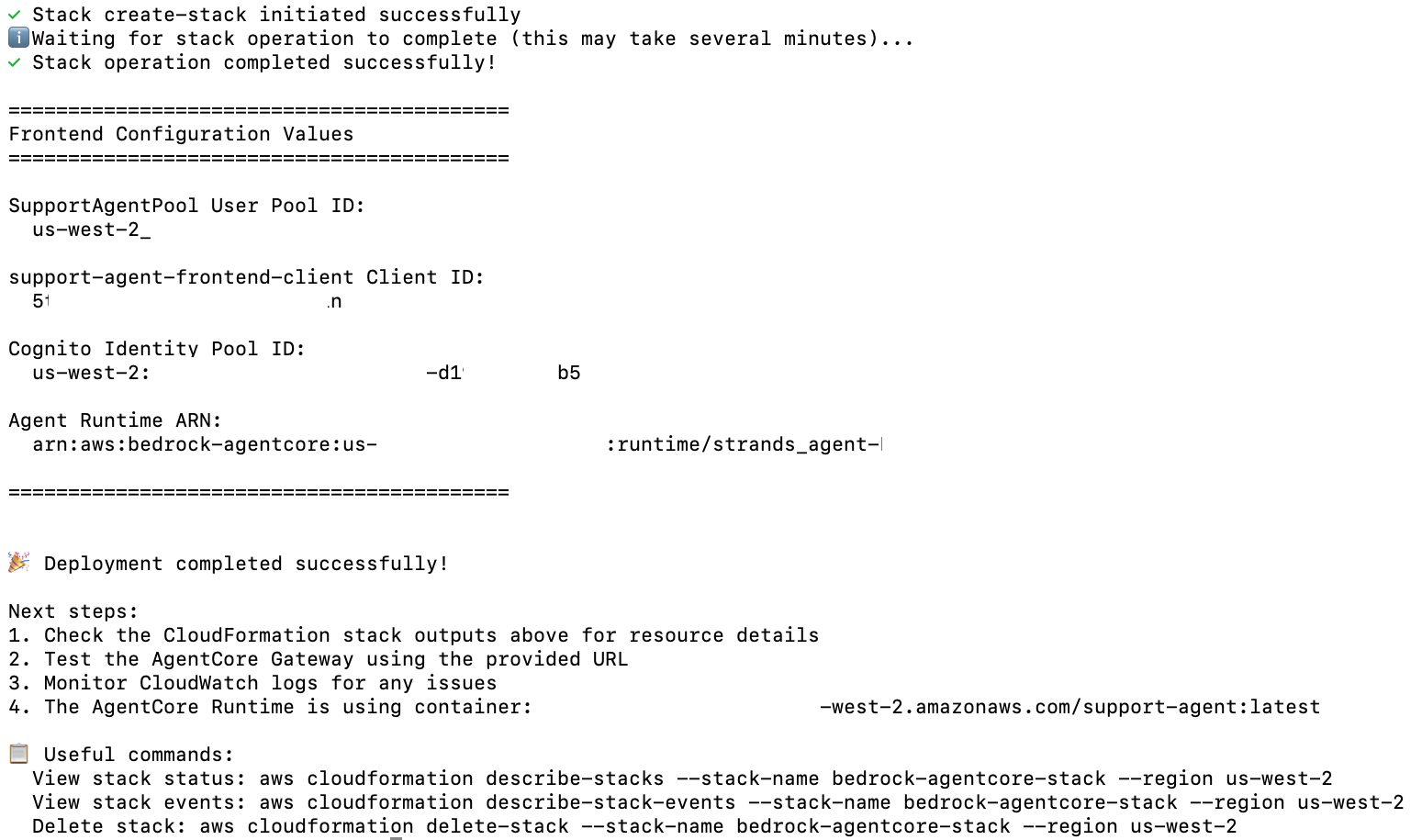
The script handles Python environment setup with uv, pre-deployment security validation (AWS CloudTrail check, template validation, credential type check), Amazon Elastic Container Registry (Amazon ECR) repository creation, Docker image build, and CloudFormation stack deployment. It verifies that CloudTrail is active in the target Region, validates the CloudFormation template, and confirms you are using temporary role credentials rather than long-term IAM user keys.
When the stack completes, the script outputs the configuration values that you need for the frontend: Cognito User Pool ID, Cognito Client ID, Cognito Identity Pool ID, and Agent Runtime Amazon Resource Name (ARN).
Step 4: Deploy the Amplify frontend
Navigate to the AWS Amplify console in your deployment Region, then follow these steps:
- Select the support-agent-frontend app.
- Choose Deploy updates in the main branch.
- Select Drag and drop as the method, then upload the
support-agent-amplify-frontend.zipfile from thefrontend/directory. - Choose Save and deploy.
Step 5: Configure and access the application
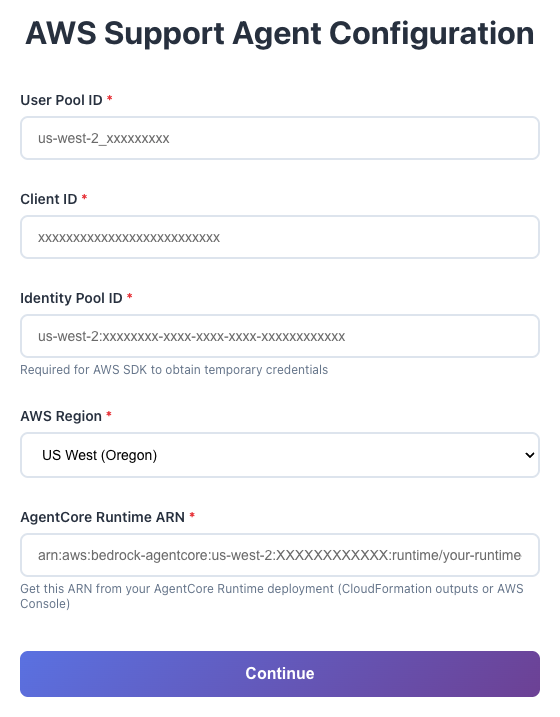
Update the frontend configuration with the CloudFormation output values (User Pool ID, Client ID, Identity Pool ID, and Runtime ARN). Create a user account through the Sign Up option, verify your email with the one-time code, and sign in.
Step 6: Interact with the agent
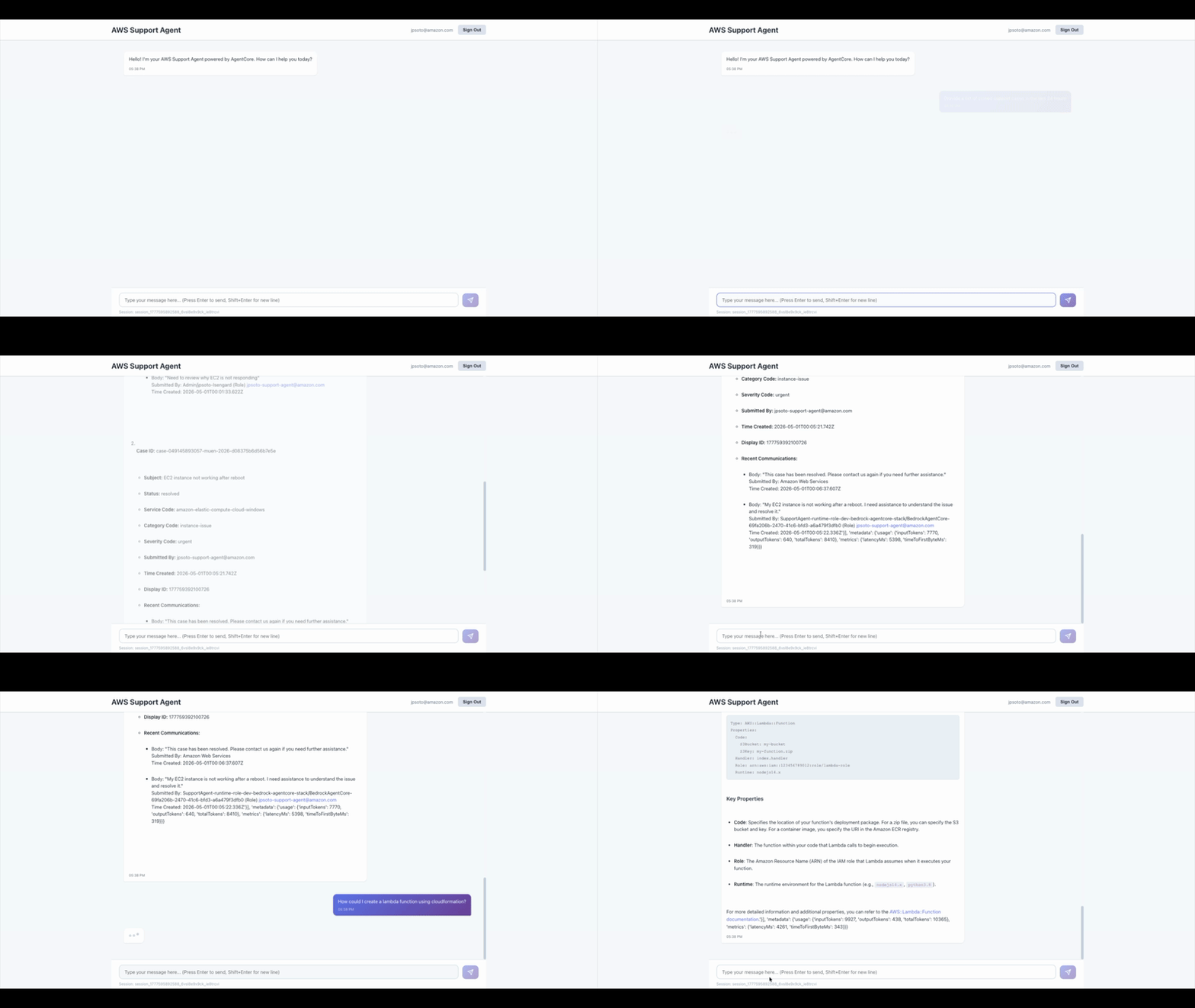
The chat interface connects to the agent running in AgentCore Runtime. The agent has access to AWS MCP servers for documentation and support, and AWS re:Post through AgentCore Gateway. Try queries like:
- “What are the best practices for securing an Amazon Simple Storage Service (Amazon S3) bucket?”
- “Help me troubleshoot a Lambda function timeout in us-east-1”
- “Create a support case for an intermittent connectivity issue with my RDS instance”
Understanding the agent code
The agent is defined in agent.py and uses the BedrockAgentCoreApp framework. This section highlights three implementation patterns that address common challenges with production agents.
Parallel MCP initialization. Loading three MCP servers sequentially adds noticeable startup latency. The agent initializes all three clients in parallel using asyncio.gather, which reduces cold start time. Each client connects to its server using uvx and registers the available tools with the Strands Agent:
# Initialize all clients in parallel
results = await asyncio.gather(
    init_aws_docs(),    # AWS Documentation MCP
    init_aws_support(), # AWS Support MCP
    init_aws_api(),     # AWS API MCP
    return_exceptions=True
)
Memory with graceful timeout. The agent uses AgentCore Memory to maintain conversation context. On each request, it retrieves the last three conversation turns with a two-second timeout. If context retrieval times out, the agent proceeds without it rather than blocking the response. After generating a response, it saves the conversation asynchronously. Memory is scoped per session ID, so each user conversation maintains its own context.
Gateway token refresh. The AgentCore Gateway client authenticates using Cognito JWT tokens stored in Secrets Manager. The agent validates token expiration before each gateway call and refreshes automatically when the token is within five minutes of expiring. Without this, gateway calls fail intermittently after the one-hour token lifetime.
Security considerations
The solution deploys with multiple security layers configured by default. Authentication uses Amazon Cognito with NIST SP 800-63B-aligned password policies. AWS WAF with rate limiting and managed rule sets protects the API Gateway. Each component has its own least-privilege IAM role, and the agent invoker Lambda redacts credential patterns from responses before returning them to users.
Amazon Bedrock Guardrails filters harmful content, blocks prompt injection (set to HIGH), redacts PII (AWS keys, credit cards, SSNs), and restricts the agent to AWS support topics. API Gateway access logs flow to Amazon CloudWatch with 90-day retention, and AWS CloudTrail captures API calls. For the full security implementation details, including encryption configuration, IAM role scoping, and guardrail policies, see SECURITY.md in the repository.
Cleanup
To avoid ongoing charges, delete the resources in this order.
Warning: these steps are irreversible. Back up any data you need before proceeding.
- Delete the Amplify app from the AWS Amplify console.
- Delete the CloudFormation stack:
aws cloudformation delete-stack --stack-name bedrock-agentcore-stack --region us-west-2 - Delete the ECR repository (CloudFormation doesn’t delete non-empty repositories):
aws ecr delete-repository --repository-name support-agent --region us-west-2 --force - Delete the S3 bucket used for CloudFormation templates:
aws s3 rb s3://cfn-templates-ACCOUNTID-us-west-2 --force
Conclusion
In this post, you built an AI-powered AWS Support Companion using Amazon Bedrock AgentCore. The agent combines foundation model reasoning with real-time access to AWS documentation, support APIs, and community knowledge through MCP and AgentCore Gateway. The solution deploys with a single script and includes authentication, rate limiting, encryption, guardrails, and audit logging.
The agent consolidates multiple investigation tools into a single conversational interface, so engineers can move from problem identification to support case creation without switching between consoles.
The sample repository includes additional guidance on network isolation, multi-account deployment, observability with AgentCore tracing, human escalation thresholds, and secret rotation for production readiness. To get started, visit the Amazon Bedrock AgentCore documentation and clone the sample repository.
If you need a fully managed incident investigation service, see AWS DevOps Agent. This post shows you how to build a custom agent on AgentCore Runtime when you need full control over the tools, model, guardrails, and workflow.
About the authors
— Originally published at aws.amazon.com
Want this in your inbox every morning?
Daily brief at your local 8am — bilingual EN/中文, free.
More from AWS Machine Learning
See more →

Building an agentic app deployer with Amazon Bedrock and AWS Lambda
PDI Technologies developed PDI Brew, enabling non-technical employees to create web applications on AWS without developer involvement, leveraging Amazon Bedrock for AI capabilities. This agentic app deployer streamlines internal tool delivery, removing traditional bottlenecks in deployment pipelines.