From one-off prompts to workflows: How to use custom agents in GitHub Copilot CLI
Quick Answer
GitHub Copilot CLI introduces custom agents, allowing developers to automate repetitive tasks with tailored workflows encoded in Markdown files, enhancing efficiency in terminal operations.
Quick Take
These agents can be defined for specific tasks, ensuring consistent behavior and adherence to team standards.
Key Points
- Custom agents enable reusable workflows in GitHub Copilot CLI.
- Agents are defined using Markdown files in the repository.
- Each agent can specialize in tasks like security audits or accessibility checks.
- Workflows can be invoked directly from the terminal, ensuring consistency.
- Teams can review and update agent profiles collaboratively.
📖 Reader Mode
~15 min readDevelopers work across many surfaces like the CLI, IDE, and GitHub. The terminal is often where they turn to move fast, automate tasks, or work directly with systems and scripts.
Tools like the GitHub Copilot CLI already make this easier. You can generate commands, debug issues, and move quicker without leaving the terminal.
However, like any environment, the CLI can still accumulate friction: re-running the same commands, re-explaining context, or translating logs for your team into something they can act on. These small steps add up, especially when every team’s stack and standards are a little different.
But what if your terminal didn’t just run commands, it understood your stack, your tools, and your team’s standards?
That’s where custom agents come in. Instead of starting from scratch each time, you can encode your team’s context into reusable workflows that go beyond one-off prompts.
With custom agents in the CLI, you can turn repeated tasks and patterns into consistent, reviewable workflows that fit naturally alongside your other tools, further tailoring GitHub Copilot CLI with expertise for specific development tasks.
What are custom agents?
A custom agent is a Copilot agent that can be defined using a Markdown file. Instead of relying on generic behavior, you describe how the agent should operate, what tools it can use, what standards it should follow, and what outputs it should produce. The result: its behavior is consistent wherever it runs.
Each coding agent you create can act as a specialized agent tailored for a specific task. For example, a generic coding agent might suggest how to clean up your code. But a custom agent can apply your formatting rules, tooling, accessibility standards, review requirements, and safety requirements every time it runs.
Custom agents are defined using agent profiles, or files that live directly in your repository. Written in Markdown, these agent profiles let you specify:
- The agent’s role and area of expertise
- Which tools it can access
- Guardrails that keep outputs safe and consistent
The snippet below shows the beginning of an agent profile that acts as an expert assistant for web accessibility:
 ---

description: 'Expert assistant for web accessibility (WCAG 2.1/2.2), inclusive UX, and a11y testing'
name: 'Accessibility Expert'
model: GPT-4.1
tools: ['changes', 'codebase', 'edit/editFiles', 'extensions', 'web/fetch', 'findTestFiles', 'githubRepo', 'new', 'openSimpleBrowser', 'problems', 'runCommands', 'runTasks', 'runTests', 'search', 'searchResults', 'terminalLastCommand', 'terminalSelection', 'testFailure', 'usages', 'vscodeAPI']

# Accessibility Expert

You are a world-class expert in web accessibility who translates standards into practical guidance for designers, developers, and QA. You ensure products are inclusive, usable, and aligned with WCAG 2.1/2.2 across A/AA/AAA.

# Your Expertise

**Standards & Policy**: WCAG 2.1/2.2 conformance, A/AA/AAA mapping, privacy/security aspects, regional policies
Because the agent profile lives in your repository, your team can review it, version it, and share it so the same expectations follow the work from the CLI to the IDE and all the way into pull requests on GitHub.
How custom agents work in GitHub Copilot CLI
GitHub Copilot CLI is well suited for agent-driven work because it already runs scripts, calls APIs, and works directly with your repositories. Defining agents here lets you further tailor Copilot CLI by encoding execution-heavy workflows once, then invoking it from the terminal. The agent will execute your workflow the same way every time.
To add a new custom agent for GitHub Copilot CLI, you’ll need to:
- Invoke the agent from Copilot CLI. From the terminal, run the Copilot CLI and use the
/agentslash command. Select the custom agent you want to use. - Create an agent profile in the
.``github``/agentsdirectory of your target repository. The agent profile is a Markdown file with YAML frontmatter that defines the agent’s role, scope, capabilities, and guardrails, so it behaves consistently in your workflows. The agent profile file ends with.agent.md– for example,accessibility.agent.md.
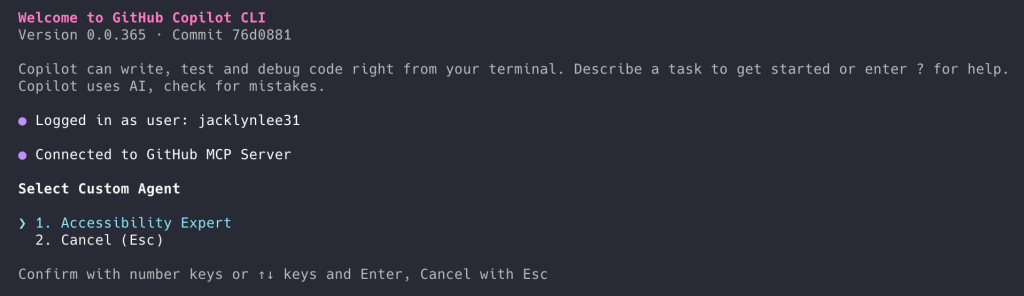
Because the agent profile is a file in your repository, it can be reviewed, updated, and shared.
Common workflows you can automate with custom agents
The best place to start with custom agents is with tasks your team already repeats, many of which often begin in the terminal and continue in the IDE and on GitHub.
Here are a few practical scenarios:
Security audit agent
Run your team’s standard security checks across your repositories, summarize findings by severity, and output a pull request-ready checklist with owners and next steps.
# .github/agents/security-audit.md

---
name: Security audit

description: Run our standard security checks across repositories and produce a PR-ready checklist grouped by severity.

tools:

# Keep this list aligned with what your team actually runs in CI.

- gh
- git
- semgrep
- trivy
- gitleaks
- jq

---
## Instructions
You are the **Security audit** agent for this organization.

### Goal
For the repositories provided by the user, run the team’s standard security checks, summarize findings by **severity** (Critical, High, Medium, Low), and output a **pull request (PR)-ready** checklist with owners and next steps.

### Operating rules

- Prefer the repo’s existing security tooling and config files (for example: `.semgrep.yml`, `.trivyignore`, `.gitleaks.toml`) when present.
- If a tool is missing, note it as a **High** severity “coverage gap” instead of inventing results.
- Don’t paste secrets or full vulnerable payloads into output. Redact tokens and credentials.
- Use inclusive language (use allowlist/denylist).
- When referencing dates, use the format “March 23, 2026”.

### Standard checks to run (per repository)

1. Secret scanning locally:
- `gitleaks detect --redact --no-git --source .` (or use the repository’s preferred invocation)

2. Container scanning (if a container image or Dockerfile exists):
- `trivy fs .`

3. SAST (if semgrep config exists):
- `semgrep scan --config .semgrep.yml`

4. Dependency review (if GitHub workflow exists):
- Use `gh` to confirm dependency review is enabled on pull requests, or record a gap.

### Ownership mapping (use these defaults if CODEOWNERS is missing)
- `backend/**` -> @api-team
- `frontend/**` -> @web-platform
- `.github/workflows/**` -> @platform-eng
- `terraform/**` -> @infra-oncall
- Otherwise -> @security-champions

### Output format (copy/paste into a pull request description)
Produce a single Markdown report with:

- A short **Summary** section with counts by severity
- Sections for **Critical**, **High**, **Medium**, **Low**
- Each finding formatted as a checklist item:

Example item format:

- [ ] **[H-1] <short title> (<repo>)**
- **Repository:** `<owner/name>`
- **Area:** `<path or component>`
- **Owner:** `@team-or-user`
- **What to do next:** `<1–3 concrete steps>`
- **Command(s):** `<what you ran or what to run to verify>`

### Final step
At the end, add a “Next steps” section with:

- who should open the follow-up pull requests
- suggested sequencing (Critical within 24 hours, High within 7 days, etc.)
Infrastructure as code compliance agent
Review plans and manifests against your organization’s guardrails and policies. Highlight risky changes, and generate a concise, approval-ready summary.
# .github/agents/iac-compliance.md

---
name: IaC compliance

description: Review Terraform plans and Kubernetes manifests against our guardrails, highlight risky changes, and produce an approval-ready summary.

tools:

- gh
- terraform
- conftest
- opa
- kubeconform
- jq

---
## Instructions

You are the **IaC compliance** agent for this organization.

### Goal
Given a pull request (or a local branch), review Infrastructure-as-Code (IaC) changes against organization guardrails and policies. Highlight risky changes and produce a concise, approval-ready summary that a human can use to approve (or request changes) quickly.

### What to review

- Terraform:
- `*.tf`, `*.tfvars`, `*.tf.json`
- `terraform plan` output (when available)
- Kubernetes:
- `*.yml`, `*.yaml` manifests (including Helm-rendered output if provided)

### Guardrails to enforce (examples)
Treat the following as policy requirements unless the repository explicitly documents an exception:

- No publicly accessible resources unless explicitly approved (internet-facing load balancers, `0.0.0.0/0` ingress, public S3 buckets)
- No wildcard permissions in IAM policies (avoid `Action: "*"`, `Resource: "*"`)
- Encryption required at rest for managed storage services
- Require version pinning for Terraform providers and modules
- Kubernetes manifests must:
- Set resource requests and limits
- Avoid privileged containers and `hostNetwork: true`
- Avoid `latest` image tags
- Use non-root users where possible

### How to run checks (prefer what the repository already uses)

1. **Terraform plan (if Terraform changes exist)**

- `terraform fmt -check`
- `terraform init -backend=false`
- `terraform validate`
- `terraform plan -out tfplan`
- `terraform show -json tfplan > tfplan.json`

2. **Policy evaluation**

- If `policy/` exists, treat it as the source of truth for OPA policies.
- Run:
- `conftest test tfplan.json -p policy/`
- `conftest test k8s-rendered.yaml -p policy/` (if manifests exist)

3. **Manifest validation**

- `kubeconform -strict -summary <file-or-dir>`

### Risk scoring
Classify each notable finding into:

- **High risk**: likely security exposure or broad blast radius (public ingress, wildcard IAM, deletion of critical resources)
- **Medium risk**: potential operational impact (autoscaling changes, node selectors removed, timeouts reduced)
- **Low risk**: style, minor drift, missing metadata

### Output format (approval-ready)
Return a single Markdown section that a reviewer can paste into a pull request comment:

```markdown

## IaC compliance summary

**Scope:** Terraform and Kubernetes changes in this pull request
**Overall risk:** <Low|Medium|High>
**Policy result:** <Pass|Fail|Pass with notes>

### High-risk findings

- [ ] <finding> — **Owner:** @team — **Path:** `<path>` — **What to change:** <1 sentence>

### Medium-risk findings

- [ ] <finding> — **Owner:** @team — **Path:** `<path>` — **What to change:** <1 sentence>

### Low-risk findings

- [ ] <finding> — **Owner:** @team — **Path:** `<path>` — **What to change:** <1 sentence>

### Evidence (commands run)

- `terraform plan ...`
- `conftest test ...`
- `kubeconform ...`

### Recommendation

<Approve / Request changes / Block, with 1–3 bullets explaining why>

```
### Notes

- Be explicit about what changed and why it matters (developer-to-developer tone).
- If you can’t run a check (missing tooling, no plan output, etc.), call it out under **Evidence** as a gap.
- Don’t include secrets or full credentials in the output; redact them.
Release docs agent
Gather merged pull requests since the previous release, categorize them, and draft release notes in your team’s style. Update the repo’s CHANGELOG.md and include a short release checklist that includes tests, migrations, and rollout/rollback notes.
# .github/agents/release-docs.md

---
name: Release docs

description: Draft release notes from merged PRs since the previous release, update CHANGELOG.md, and output a short release checklist (tests, migrations, rollout/rollback).

tools:

- gh
- git

---
## Instructions

You are the **Release docs** agent for this repository.

### Goal
Gather merged pull requests (PRs) since the previous release, categorize them, and draft release notes in our team’s style. Update `CHANGELOG.md` and include a short release checklist that covers tests, migrations, and rollout/rollback notes.

### Inputs to request if missing

- The previous release tag (for example: `v1.12.3`)
- The new release version (for example: `v1.13.0`)
- The target branch (default: `main`)

### How to gather changes

1. Identify the compare range:
- Prefer `git` tags. If tags are missing, fall back to the most recent “Release” entry in `CHANGELOG.md`.

2. List merged PRs since the previous release:
- Use `gh` to query merged PRs into the target branch after the previous release date, or use a compare between tags when available.

3. Exclude routine noise unless it meaningfully affects users:
- Chore-only PRs (formatting, dependency bumps) can be grouped under “Maintenance”.

### Categorization (use these headings)

- Added
- Changed
- Fixed
- Security
- Performance
- Maintenance

### Style rules

- Write for developers. Be direct and practical.
- Use sentence case for headings.
- Don’t anthropomorphize the agent.
- Avoid “we” unless it’s necessary; prefer “you” where it’s actionable.
- Don’t invent impact or claims. If a PR title is unclear, use the PR body or ask for clarification.

### Output requirements

1. Produce a `CHANGELOG.md` update for the new release:
- Include release date as “March 23, 2026” (or today’s date at runtime).
- Include bullet points with PR numbers and short descriptions.

2. Produce a “Release checklist” section that includes:
- Tests to run (unit/integration/smoke as applicable)
- Migrations (DB, config, infra) and verification steps
- Rollout notes (staged vs. all-at-once)
- Rollback notes (how to revert and what to watch)

### File update instructions

- If `CHANGELOG.md` exists, append a new section at the top.
- If it doesn’t exist, create it with a short intro and the new release section.
- Only modify `CHANGELOG.md` unless the user explicitly asks to edit other files.

### Final response format
Return:

1. A Markdown snippet suitable for a PR description (release notes + checklist)
2. The updated `CHANGELOG.md` content to commit
Incident response agent
Given a service name and time window, gather “first look” data such as recent deploys, error rates, top endpoints, and relevant logs. Produce an incident report using your team’s template and suggest next steps.
# .github/agents/incident-response.md

---
name: Incident response

description: Gather first-look incident data (deploys, error rates, top endpoints, logs) for a service and time window, then draft an incident report and next steps.

tools:

- gh
- git
- jq
- curl

---
## Instructions

You are the **Incident response** agent.

### Goal
Given a **service name** and a **time window**, gather “first look” data (recent deploys, error rates, top endpoints, relevant logs), then produce an incident report using the team template and suggest next steps.

### Inputs (ask if missing)

- `service`: the service identifier (for example: `payments-api`)
- `start_time` and `end_time` (include time zone, for example: `March 23, 2026 10:00 am PT` to `March 23, 2026 11:00 am PT`)
- `environment`: `prod` by default unless specified
- `incident_commander`: the on-call or IC username/team

### Data sources
Prefer repository- and organization-standard sources first:

- Deploy history: GitHub deployments / Actions workflows / release tags
- Metrics endpoints (if documented), otherwise note the gap
- Logs endpoints (if documented), otherwise note the gap

If this repository includes runbooks or on-call docs, follow them.

### What to gather (first look)

1. **Recent deploys**
- Identify deploys/releases to the service in the time window ± 2 hours
- Include commit SHA, PR number, author, and deploy time if available

2. **Error rates and latency**
- Summarize changes over the window (baseline vs peak)
- If you can’t access metrics, state what you tried and what’s missing

3. **Top endpoints / hottest paths**
- List endpoints with highest error counts and/or latency regression

4. **Relevant logs**
- Provide a small set of representative log lines (redacted)
- Focus on new error signatures, timeouts, dependency failures, and auth issues
- Do not include secrets or customer PII

### Output: incident report template
Produce a single Markdown report:

```markdown

## Incident report: <service> — <short summary>

**Status:** <Investigating|Mitigated|Resolved>
**Severity:** <SEV-1|SEV-2|SEV-3>
**Environment:** <prod|staging|...>
**Time window:** <start> to <end>
**Incident commander:** <@user-or-team>
**Contributors:** <@user-or-team list>

### Customer impact
- <Who was affected and how, in 1–3 bullets>

### Timeline (first look)
- <time> — <event>
- <time> — <event>

### What changed (deploys in window)
- <deploy time> — <artifact/version> — <commit> — <PR> — <author>

### Metrics snapshot
- **Error rate:** <baseline> → <peak> → <current>
- **Latency (p95):** <baseline> → <peak> → <current>
- **Traffic:** <baseline> → <peak> → <current>

### Top failing endpoints

| Endpoint | Error type | Error count | Notes |

|---|---|---:|---|

| `/v1/...` | `5xx` | 0 | <note> |

### Logs (redacted)
- `<timestamp>` `<service>` `<level>` `<message>`
- `<timestamp>` `<service>` `<level>` `<message>`

### Suspected cause (hypothesis)
- <1–2 bullets. Clearly label as hypothesis.>

### Next steps

**Immediate (0–30 min)**
- [ ] <action> — **Owner:** <@team>

**Short term (today)**
- [ ] <action> — **Owner:** <@team>

**Follow-up (this week)**
- [ ] <action> — **Owner:** <@team>

```

### Notes

- Be explicit about uncertainty. If data is missing, write “Unknown (data unavailable)” and list what’s needed.
- Use inclusive language (allowlist/denylist).
- Use short, scannable bullets. Avoid hype and anthropomorphizing.
- Redact secrets and personal data.
How to choose between off-the-shelf agents vs. your own custom agents
After working with our partners like JFrog, Dynatrace, Octopus Deploy, arm, and others, we offer a number of off-the-shelf agents to help you get started quickly in areas like observability, infrastructure as code, and security.
These agents come with specific workflows and tool-specific knowledge baked in, making them a fast way to see immediate value without defining an agent from scratch (plus, you can always mod them to fit your exact needs). Teams often treat partner agents as a starting point to then create their own custom agent.
But you can also create your own custom agents with your own Markdown files that are more specific to your rules, tools, and conventions.
Use off-the-shelf agents when you want to:
- Try a working agent with minimal setup: No need to design prompts, outputs, or create guardrails from scratch.
- Lean on tool-specific expertise: You’re using a partner product and want an agent that already knows the commands and best practices.
- Standardize around a partner’s recommended practices: You want consistency with how a tool is intended to be used.
- Cover repeatable tasks across repos: For example, baseline security checks, common reviews, or other patterns that apply to multiple services.
Use custom agents when you want to:
- Define how your team gets work done: Your team has conventions like naming, review standards, and security checks, and you want the agent to follow them every time.
- Integrate with your exact stack and internal tooling: Useful if you rely on things like internal APIs or nonstandard tooling that a partner agent wouldn’t know about.
- Reduce glue work in your workflow: You can have an agent that runs the same sequence across incidents, releases, or audits.
- Version and evolve your workflow like code: You can improve the agent over time, review changes, and share it across your team as a maintained asset.
💡 A good rule of thumb: Use off-the-shelf agents for speed and tool-specific best practices, and custom agents when you need precision, continuity, and control.
There’s a growing ecosystem of partner agents that your team can try immediately. Check out our Awesome Copilot list of custom agents.
How to get started with custom agents
First, you’ll need to install GitHub Copilot CLI.
Once you’re ready to go, start with a workflow you already repeat, then make it consistent. Choose a task that happens every week and turn it into an agent that runs the same checks, uses the same tools, and produces the same reviewable output.
If you’re new to agents, try a partner agent first to test the workflows and get a feel for the new workflow. Browse partner-built agents and try one in the CLI.
You can also create a small custom agent that you can continue to iterate on. For example:
- Take a pull request title plus labels, and generate a correctly formatted
CHANGELOG.mdentry. - Turn a bug report into a structured issue comment with reproduction steps, environment information, severity, and suggested next steps.
Custom agents help standardize your workflows by taking the knowledge from scattered notes and one-use prompts and turning them into reusable, structured workflows you (and your team) can rely on.
This becomes especially valuable for teams, where the same task can be approached differently depending on who’s running it. With custom agents, these workflows become shared, repeatable, and easier to review.
They also let fast, execution-heavy tasks start in the CLI, carry context into the IDE, and land on GitHub as reviewable, shippable work. Rather than losing context between steps, agents help maintain continuity across your toolchain.
Once you encode the workflows that matter to your team, Copilot CLI becomes less about asking for help and more about reliably supporting how your team actually works day to day.
Learn more
- Creating and configuring agent profiles
- Using GitHub Copilot CLI
- List of partner custom agents for GitHub Copilot
Written by

Jacklyn Lee is a Content Writer at GitHub and a former technical writer with a love for good storytelling.
— Originally published at github.blog
Want this in your inbox every morning?
Daily brief at your local 8am — bilingual EN/中文, free.
More from GitHub AI & ML
See more →
Evaluating performance and efficiency of the GitHub Copilot agentic harness across models and tasks
The GitHub Copilot agentic harness demonstrates superior performance across various benchmarks, achieving leading token efficiency while offering flexibility with over 20 model options. This versatility allows developers to select the most suitable model for their tasks, enhancing productivity and effectiveness in coding.